Draft offers and quotes from CRM data, product catalogue and a tone-of-voice profile — with an approval workflow before sending. Reduces administrative overhead, not the sales conversation.
In short: From CRM + product catalogue + tone-of-voice profile the agent produces offers as drafts. Stack: Claude for generation and voice consistency, structured CRM read (HubSpot, Pipedrive, Salesforce, Bexio, Microsoft Dynamics), template engine, approval workflow with two-click sign-off. Anti-hype: Offer automation pays back from around 50 offers per month with mostly stable product configurations. For highly individual offers or small volumes, a clean Word template plus manual adjustment is often cheaper and more honest — and we say that to our customers too.
Standard offers in a Swiss SMB typically cost 30 to 60 minutes of pure typing work each — open the CRM, copy the customer address, assemble the product selection from the catalogue, calculate discounts by customer group, adapt the template, generate the PDF, write the cover mail, file it internally. For a trading company with 200 offer requests per month, that adds up to 100 to 200 hours that don't go into consulting, prospecting or relationship work. This isn't a published benchmark — it's a directionally well-supported empirical pattern from discovery calls with trade and services SMBs.
There's also an indirect effect: whoever gets offers out faster also closes more. In B2B sales the relationship between response speed and conversion is well documented — a vendor who only replies with an offer three days after the request is competing against two or three others who have already responded. The salesperson who had a strong customer conversation doesn't lose on content, they lose on administrative latency. But: not every offer needs AI. For highly individual configurations, small volumes (ten offers per month) or high-ticket bespoke deals, the manual Word template is often faster, more transparent and frankly more honest to the customer.
The pipeline is linear. The agent reads customer data from the CRM (HubSpot, Pipedrive, Salesforce, Bexio, Microsoft Dynamics, Close.io or custom CRMs via REST), pulls the selected products or configurations from the product catalogue and applies the configured business rules: standard discount by customer group, volume discount tiers, seasonal pricing, payment terms. It then generates the offer against a customer-specific template, respecting the tone-of-voice profile — distilled from 20 to 50 successful existing offers at the customer, so not a generic voice pattern but one that actually sounds like the salesperson. Output is a PDF draft plus a cover mail. Before sending: approval queue with two-click sign-off, or, for highly standardised offers and once acceptance is calibrated, confidence-gated auto-send.
Business rules must be configured explicitly — the agent must not get "creative" with discounts. The standard pattern is a defined discount DSL (for example: "customer type A gets 10 % up to 50,000 CHF, then 15 %") which the agent applies, deterministic and traceable. Special discounts for strategic customers remain manual. In unclear cases — a new customer with no discount profile, a special request outside the standard configuration, an unusual product combination — the agent escalates to the salesperson with the reasoning and CRM context exposed. On the model side, Claude is used for generation and voice consistency; where data residency in Switzerland is a contractual requirement, Azure OpenAI Switzerland is the alternative.
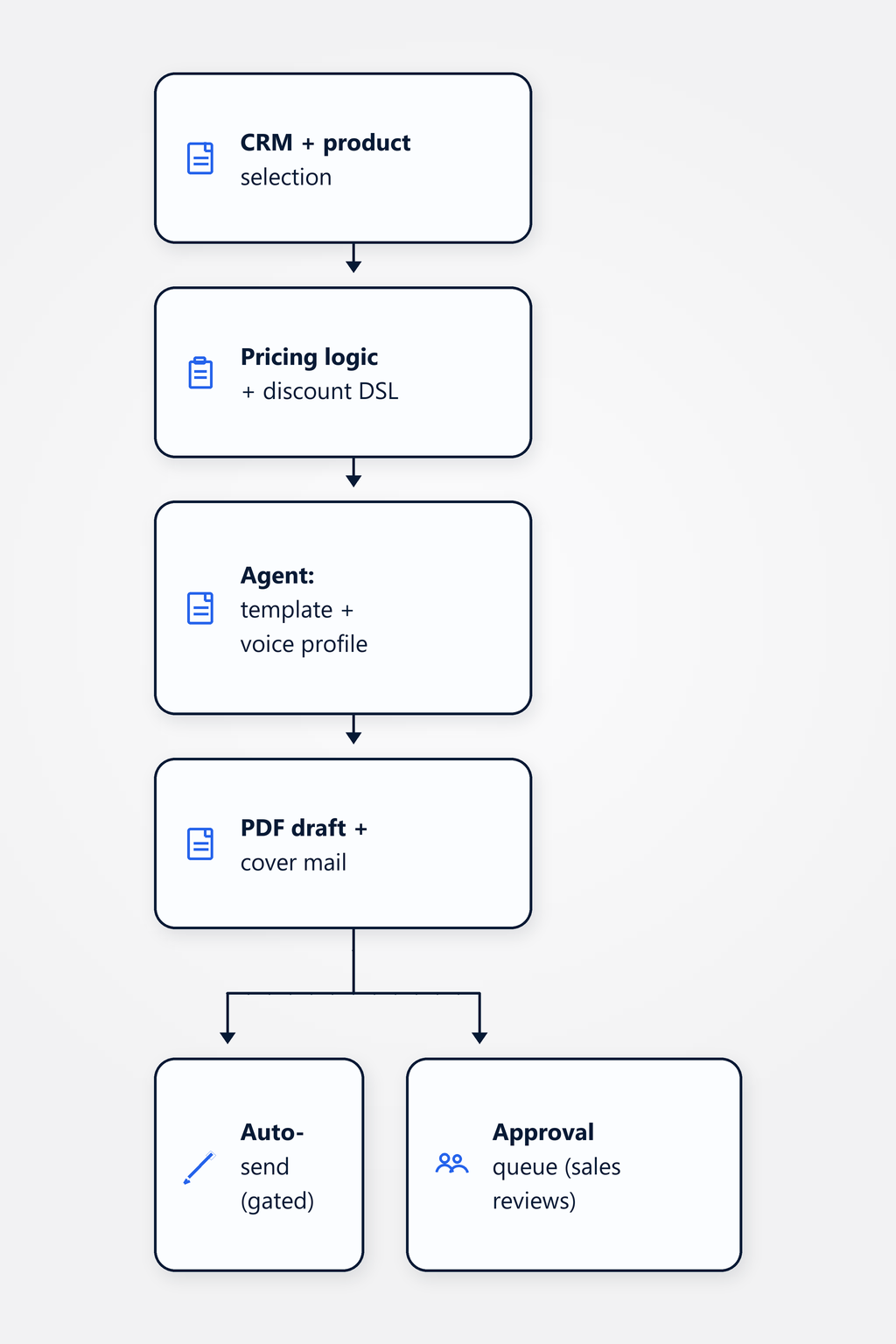
Important: the agent does not replace the sales conversation. It reduces the administrative overhead that sits between "yes, I'll send you an offer" and the actually-sent PDF. Anyone selling the agent as a replacement for sales work loses the trust of the sales team within the first month — and with it the use case.
A Swiss trading company — composite, not a real client — with around 200 offer requests per month from a catalogue of roughly 80 products. The mix is typical: around 90 % standard configurations (customer orders three known products at the standard discount) and around 10 % individually configured setups (special conditions, custom bundles, different delivery dates). Before the agent, two back-office staff spent around 40 % of their working time on offer creation — open the CRM, copy addresses, assemble prices and discounts, generate the PDF. After rollout the agent automatically pulls CRM data, applies the configured discount DSL, generates the PDF against the template and writes the cover mail in the established voice. The back-office staff review the 90 % standard drafts in the approval queue (two clicks per offer); the 10 % special cases still land on their desk — but now with the context filled in, not starting from zero.
Typical effect: an offer draft is produced in two to five minutes of agent runtime instead of 30 to 60 minutes of manual typing — directional, not a published benchmark, and highly dependent on template stability, CRM data cleanliness and how detailed the business rules are. The salesperson or back-office staff member does the final polish in review rather than producing every offer by hand. Important: this does not replace the sales conversation, it reduces the administrative overhead between the conversation and the PDF. Where the sales team was previously tied up with 100 to 200 hours of offer typing per month, that time flows back into consulting, prospecting and relationship work. The effect scales with template stability and volume — for highly individual offers or small volumes the leverage is small to non-existent.
Yes — using CRM profiles (standard discount by customer group), business rules (volume discount tiers, seasonal pricing, payment terms) and the product catalogue. Important: the business rules must be configured explicitly, the agent must not get "creative" with discounts. The standard pattern is a defined discount DSL — for example "customer type A gets 10 % discount up to 50,000 CHF, then 15 %, plus an additional 5 % when ordering three or more products at once". The agent applies this rule deterministically and traceably. Special discounts for strategic customers stay manual — the agent makes no assumptions there. For unclear cases — a new customer without a discount profile, or a combination not covered by the DSL — the agent escalates to the salesperson with reasoning exposed.
For structured special requests — for example "different delivery date", "additional service X", "deviating payment terms" — the agent includes them in the offer draft but marks them explicitly as "needs-review" and presents them to the salesperson for confirmation. For unstructured or ambiguous requests ("can you deliver it the same way as last time?", "does it make a difference if I pay half upfront?") the agent escalates directly to the salesperson with context from CRM history — recent orders, previous special conditions, contract notes. Rule of thumb: if the agent has to interpret more than two data sources to assess a special request (CRM note plus prior history plus contract clause), it escalates. That's a deliberate guardrail against hallucinated commitments.
Sample-based. We read in 20 to 50 successful existing offers from the customer and distil a tone-of-voice profile — salutation style (formal vs. informal, "Dear Mr/Ms" vs. first name), formality level, industry-specific vocabulary, favourite phrases and closing formula. This profile is loaded into the agent as a style guide, and generation happens in that voice. Quarterly review: the salesperson flags offers in the approval queue with "tone off", and the profile is adjusted based on those flags. Important: the profile is customer-specific, not industry-specific — a law firm sounds different from a furniture retailer, even when both communicate formally. A generic "B2B sales voice" template doesn't work and is immediately recognised as artificial by the recipient.
This use case sits in the AI Engineering practice and connects to neighboring sales and customer-operations use cases.
Practice: LLM applications in production — structured generation, voice consistency, evaluation, guardrails, platform choice.
Classify inbound mails, draft replies and route into the CRM — with an approval queue for the uncertain cases.
Turn meeting recordings or notes into structured action items, follow-ups and CRM updates — with review before sending.
Offer automation pays back from around 50 offers per month with mostly stable product configurations. For highly individual offers or small volumes, a clean Word template plus manual adjustment is often cheaper and more honest — and we'll tell you that before the engagement, not after. In a non-binding 30-minute discovery call we'll look at your offer process and discuss whether an agent or a well-maintained Word template is the better path.
Book a discovery call