Classify inbound mails (Sales / Support / Spam / escalate), generate reply drafts, route to the right CRM owner — with an approval queue for the uncertain cases.
In short: Classify inbound mails (Sales / Support / Spam / escalate), draft replies, route to the CRM. Stack: Claude for classification and structured output, webhook integration into the CRM (HubSpot, Pipedrive, Salesforce, Bexio, Microsoft Dynamics), approval queue for the uncertain cases. Anti-hype: when inbound is below around 20 mails/day or the sender distribution is very stable, classical rule-routing (regex + whitelist) is often cheaper and more transparent — and we say that to our customers too. The agent earns its place where volume AND variability grow at the same time.
In growing Swiss SMBs inbound mails often land in a single shared mailbox — and one person (office manager, junior sales, occasionally the founder) decides manually: sales lead, support ticket, spam, vendor outreach, escalation. At ten mails a day this works. At fifty or a hundred, triage becomes the bottleneck. Latency eats conversion: a sales lead waiting four hours for a first reply is often already gone — in parallel they've contacted three other vendors and will take whoever responds first. At the same time, real support issues sit unseen in the inbox for hours while the triaging person manually filters out recruiter cold outreach.
But: not every inbox needs AI. For a clearly structured mailbox with recognisable sender domains and stable subject patterns, classical rule routing (regex + whitelist by domain + subject filter) is often cheaper and more transparent than an LLM-based agent. Honest diagnosis first, then the right tool — sometimes the answer is "maintain thirty rules, don't build an agent". The agent only earns its keep when both the volume and the variability of the inbound are high at the same time, and rule routing produces either too many misclassifications or too much maintenance work.
The pipeline is linear. Inbound mail arrives via IMAP connector or mail provider webhook (Microsoft Graph for M365, Gmail API for Google Workspace) at the agent. Step one: classification against a customer-specific category catalogue — typically Sales / Support / Vendor / Recruiter / Spam / Escalation. Classification runs on Claude with structured output, no free text: one JSON per mail with category, sub-category, confidence score and a short reasoning. Step two: for classified sales or support mails the agent generates a reply draft (calendar link for demo requests, confirmation with ticket ID for support cases, polite decline for vendor outreach). Step three: routing — the agent creates a lead, contact or ticket in the CRM and writes the contextual briefing alongside (original mail, classification, confidence, suggested reply).
The crucial piece is the confidence gate before sending: above a configurable threshold the draft (for certain categories, e.g. demo request with calendar link) goes straight out or into an approval queue with two-click sign-off. Below the threshold the agent explicitly escalates — the triaging person sees the mail with the classification suggestion and decides themselves. Spam and cold outreach are always processed autonomously, suspected escalations never. The CRM routing uses REST/webhooks and supports HubSpot, Pipedrive, Salesforce, Bexio, Microsoft Dynamics, Close.io as well as custom CRMs via standard REST.
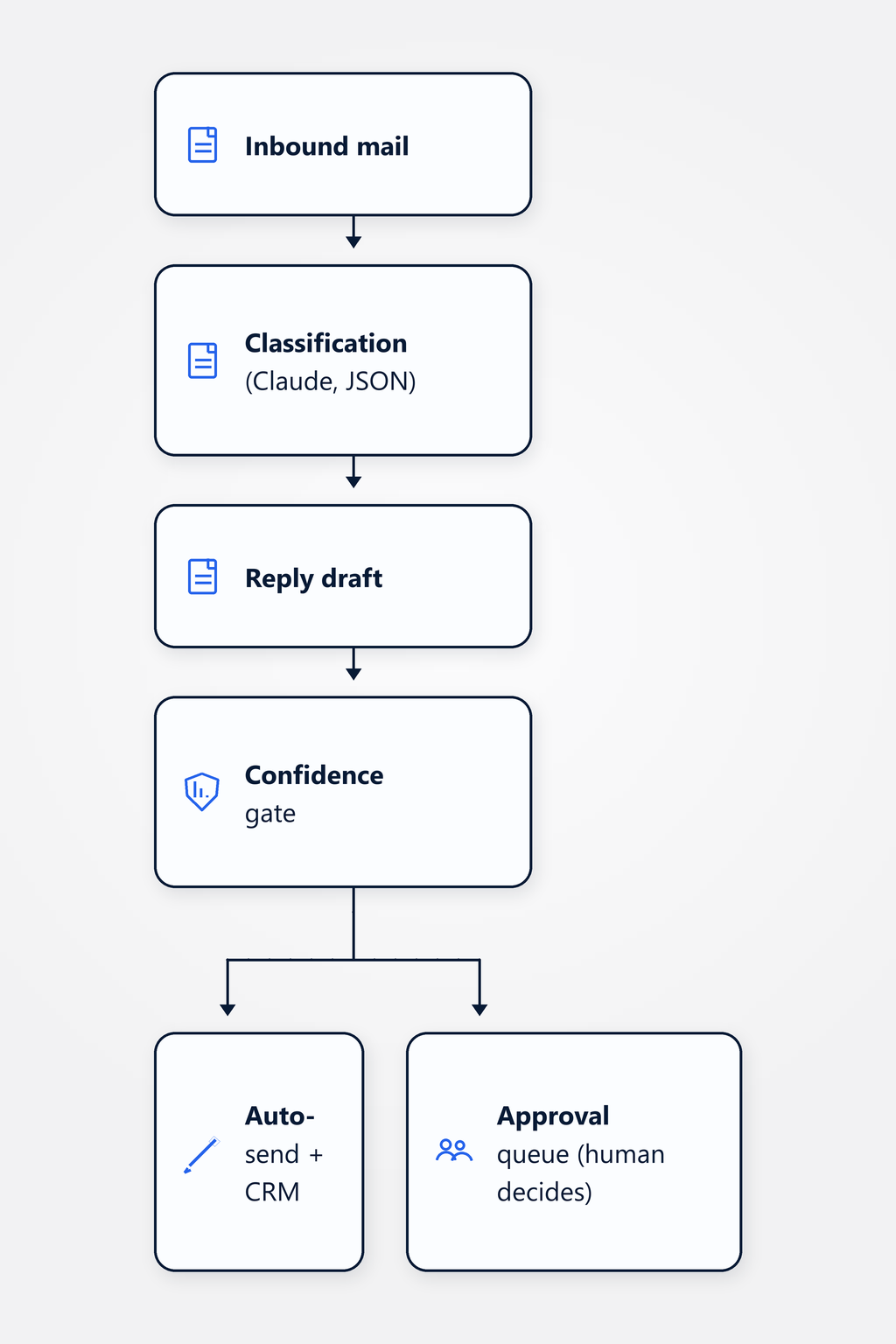
Important: the confidence gate is the ethical line. Set it too loose and you risk embarrassing auto-sends to real customers. We recommend starting with the approval queue for all categories except spam — auto-send is only enabled after a measured acceptance rate, and only for selected categories.
A B2B SaaS vendor — composite, not a real client — with around 50 inbound mails per day and no clear ownership rule for the shared inbox. A mix of sales requests (demo request, pricing question, trial sign-up), support tickets (in-product bug report, feature question, integration help), vendor outbound (NDA requests, sponsorship pitches), recruiter cold outreach. Before the agent the office manager worked through the inbox twice a day — typically 60 to 90 minutes at a stretch, with the result that sales leads waited on average three to four hours for a first reply. After rollout the agent classifies every incoming mail in under 30 seconds; demo requests automatically receive a calendar link, bug reports land directly in the HubSpot support pipeline with the briefing filled in, recruiter mails are politely declined and archived. The office manager reviews the approval queue once a day (typically ten minutes) and decides on the cases the agent escalated as "uncertain".
Typical effect: the first reply to a sales lead goes out in minutes instead of hours, the CRM stays cleanly populated with classification and context, routine inbound (cold outreach, NDA requests, standard sales questions) no longer ties up human attention. Important: this saves latency and mental load but does not replace the sales or support person — they become faster and more focused. The hard cases (complex enterprise lead, ambiguous support request, potential escalation) still land with a human, but now with a contextual briefing rather than out of the raw inbox. How strong the effect is depends directionally on inbound volume, distribution variability and CRM discipline — that's an empirical pattern from engagements, not a published benchmark.
Configurable. Our default recommendation: start with an approval queue for all categories except spam — the agent drafts, a human reviews with two clicks. After four to six weeks we measure the acceptance rate per category: if over 85 % of drafts are approved without content changes, auto-send can be enabled for that category — typically first for "demo request → send calendar link" and similarly well-defined patterns. The 85 % threshold is a directional empirical value, not a published benchmark — the actual number depends on voice consistency, tone and business context. Spam and cold outreach are always handled autonomously. Suspected escalations are never auto-sent. That line is non-negotiable.
When inbound volume is below around 20 mails per day, rule routing (regex + whitelist by sender domain + subject pattern) is often cheaper and more transparent than an agent. Maintaining 30 rules is manageable; deploying an LLM to classify 20 mails a day is over-engineering — token costs dominate, maintenance comes on top. When the inbound distribution is very stable (e.g. 80 % support, 15 % sales, 5 % spam with clearly recognisable sender patterns), classical filters are also enough. Only when both volume AND variability grow at the same time — when inbound becomes more diverse and rule maintenance balloons disproportionately — does the agent become worthwhile. We say that to our customers too, and sometimes send them away with "don't buy this from us". That's not marketing, it's clean diagnosis.
REST/webhook is the default. Supported: HubSpot, Pipedrive, Salesforce, Bexio, Microsoft Dynamics, Close.io and custom CRMs via standard REST. The agent creates a lead, contact or ticket in the CRM with a contextual briefing: original mail, classification, confidence score, suggested reply draft, sub-category notes. The responsible sales rep or support agent sees the CRM item, checks it and sends the reply — or triggers an action directly via the approval queue. Important: we recommend not letting the agent set the lead score initially — score drift (the agent systematically rates leads too high or too low without anyone noticing) is a common pitfall and poisons CRM discipline over time. Score setting stays with humans first; once acceptance is calibrated, that can be shifted incrementally.
This use case sits in the AI Engineering practice and connects to neighboring customer-operations use cases.
Practice: LLM applications in production — classification pipelines, structured output, evaluation, guardrails, platform choice.
Review contracts against a customer-specific ruleset — traffic-light red/yellow/green per clause, first-pass review in minutes, lawyer attention on the red cases.
Answer support requests across DE / FR / IT / EN — same knowledge base, same tone, escalation on the complex cases.
Draft offers from structured request inputs (form, mail classification) — with pricing logic and a review queue before sending.
Sales/support triage automation pays back from around 30 mails per day with real distribution variability. For small or clearly structured inboxes, classical rule routing is usually cheaper — and we'll tell you that honestly before we tie up your time. In a non-binding 30-minute discovery call we'll look at your actual inbox and talk through whether an agent or rule maintenance is the better path.
Book a discovery call