Extract decisions and action items with assignee and due date from meeting recordings — straight into Linear, Asana, Jira or MS Planner. With recording consent and FADP-compliant retention.
In short: Transcribes meetings (Zoom, Teams, Google Meet or local recording), extracts decisions and action items with assignee and due date, syncs to project tools like Linear, Asana, Jira or MS Planner. Stack: Whisper for transcription (99+ languages per OpenAI, with DE/EN/FR/IT all production-ready in Swiss contexts), Claude for extraction, REST or webhook into the chosen tool. Anti-hype: Meeting action tracking pays back when the team has many meetings and action items frequently fall through the cracks. For small teams with strong meeting discipline, a simple shared note is often enough. Recording consent is mandatory — all participants must be informed before recording begins and able to opt out.
In a typical Swiss SMB leadership team five to eight weekly meetings run in parallel: strategy, sales, tech, operations, plus various 1-on-1s. Each of these meetings produces action items — usually a mix of clear assignments ("Anna sends the offer by Friday") and contextual discussion ("we should look into that next quarter"). What's still tangible on Monday depends on the weakest link in note-taking discipline. Whoever gets nominated to "take notes" does it carefully for two weeks — after that it gets unreliable, notes become subjective, action-item granularity varies from person to person, and nobody enjoys the job.
Classic meeting bots either produce raw transcripts (too much text, nobody reads them) or structured but generic outputs without project-tool integration. The actual problem is not transcription — Whisper has solved that for years — but the clean separation between actionable statements and discussion context, and reliably writing into the chosen project tool with the right assignee and due date. There's also a sensitive topic on top: recording consent. In the German-speaking region not every employee is comfortable being recorded — ignoring that risks trust, employment-rights issues and, depending on the canton, even criminal exposure.
The pipeline is linear. The meeting is recorded (with consent from all participants) — either via the native cloud recording feature of Zoom, Teams or Google Meet, or via a local recording. Whisper transcribes the audio (99+ languages per OpenAI documentation; in Swiss practice DE, EN, FR and IT together cover the vast majority of meetings, including DE↔EN code-switching, which is the norm in CH tech teams). Claude reads the transcript and extracts in a single structured pass: decisions ("we'll do X"), action items with assignee and due date ("Anna does Y by Friday"), and open points for follow-up meetings. The agent then writes via REST or webhook into the chosen project tool — Linear, Asana, Jira, MS Planner, Notion, ClickUp, Trello, plus custom tools.
Three mechanisms are important. First: a confidence gate. Not every statement in a meeting is an action item — "we should look at marketing automation at some point" is discussion, not an assignment. Low confidence lands in a review queue as a suggestion, confirmed-and-written rather than blindly written. Second: tool-specific formats. Linear prefers short titles with labels, Asana structured fields, Jira story format. The agent adapts output per target tool. Third: retention rules. Standard pattern: audio is deleted after transcription (or configurable 7-30 days), transcript stays 30-90 days, action items live permanently in the project tool. For sensitive topics — HR, strategy, personnel decisions — either no recording at all or tightened retention rules. On the model side: Whisper for transcription, Claude for extraction; where data residency in Switzerland is a contractual requirement, Azure OpenAI Switzerland is the alternative.
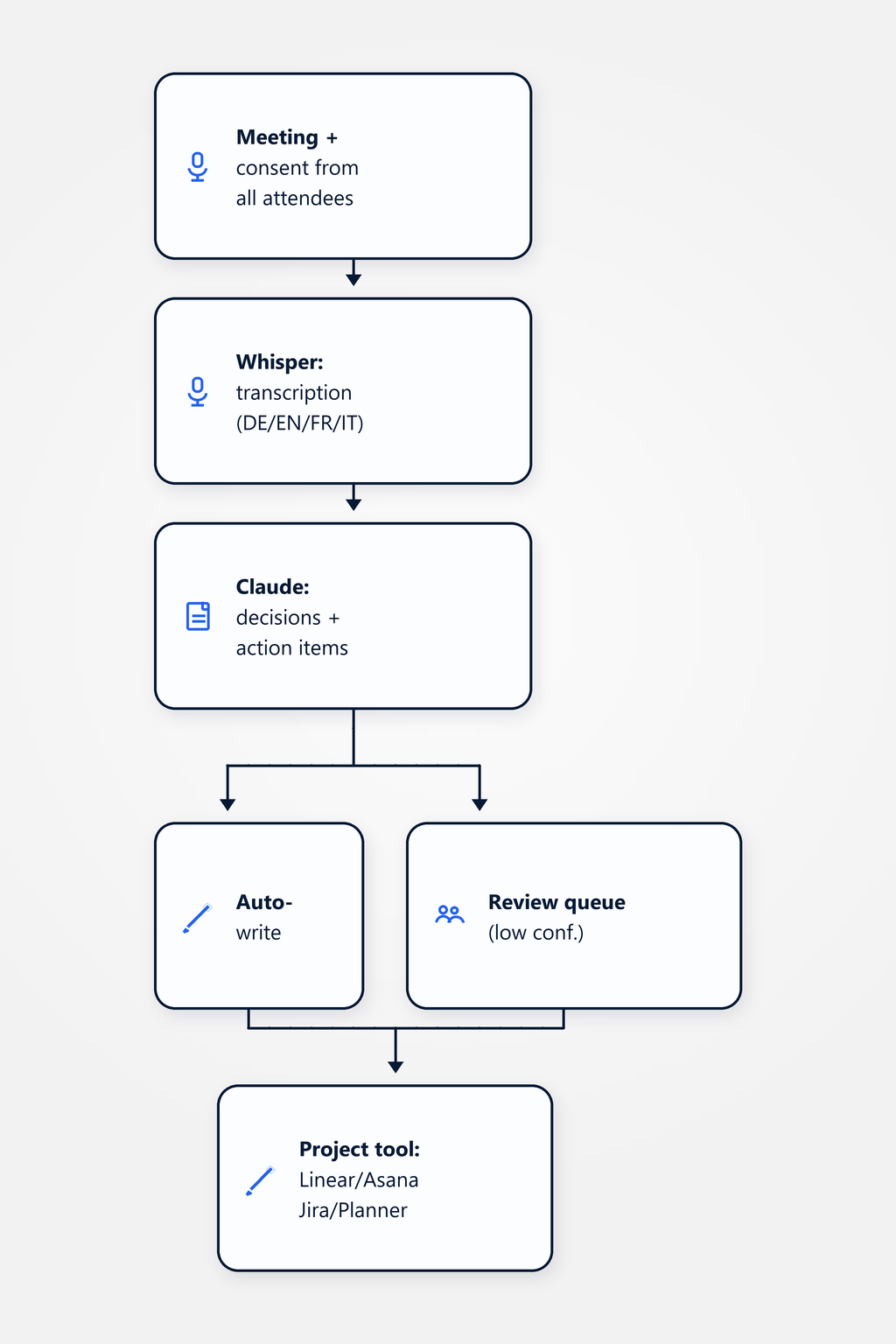
Important: the agent doesn't reduce the discussion value of a meeting — that comes from the people in the room. It reliably captures the output of the meeting so that follow-up meetings don't start with "where were we?" but with status.
A Swiss SMB leadership team — composite, not a real client — with five weekly meetings (strategy, sales, tech, operations, 1-on-1s) and Linear as the project tool. DE↔EN code-switching is the norm in the tech and strategy meetings, while sales and operations meetings tend to stay in German. Before the agent: a rotating "note-taker" per meeting, action items dropped into a shared Confluence doc that nobody maintains; roughly 30 % of action items quietly evaporate because they're never transferred from notes into Linear. After rollout (with a clear consent process: participants are informed at meeting start, opt-out is possible, sensitive HR and strategy sessions run without recording): Whisper transcribes, Claude extracts typically 5-12 action items per meeting, of which 70-80 % are written directly into Linear with high confidence (with assignee and due date), and the remainder lands in the review queue. An end-of-day digest of everything written goes to the attendees.
Typical effect: action items land structured in the project tool within minutes of the meeting ending, with assignee and due date instead of as prose in a notes doc. Follow-up meetings open with status ("what happened on A, B, C since last week?") instead of with "where were we?". Directional, not a published benchmark, and highly dependent on meeting discipline and transcription quality — heavily technical discussions with strong CH-dialect or poor audio reduce extraction confidence and lengthen the review queue. Important: this does not reduce the value of the discussion itself — that lives between people, not in the transcript. The agent only captures the output reliably. Anyone selling it as a replacement for meeting discipline loses the team within two weeks.
Recording consent is mandatory — all participants must be informed before recording begins and able to opt out. In the German-speaking region not every employee is comfortable with recording; we recommend a clear opt-out path and transparent communication about what happens with the recording. FADP-compliant retention: standard pattern is to delete audio after transcription (or configurable 7-30 days), keep the transcript for 30-90 days, and let action items live permanently in the project tool. For sensitive topics like HR conversations, strategic discussions or personnel decisions, either no recording at all or tightened retention rules and a narrower access circle. Final data-privacy sign-off rests with the customer's data-protection officer — the agent provides configurable mechanisms, not a blanket OK.
Whisper supports 99+ languages for transcription according to OpenAI documentation — in Swiss practice DE, EN, FR and IT are all production-ready, with good handling of Swiss specifics like DE↔EN code-switching, which is the norm in CH tech meetings. Extraction is language-agnostic: Claude processes transcripts in any language and produces structured action items. Output language is configurable — typical setup is output in the project tool's language (Linear teams often work in English, MS Planner often in the language of the site). Swiss German dialect often works well but not reliably — for important meetings we recommend Standard German or explicit audio quality where dialect handling has been tested.
REST or webhook is the standard path. Directly supported: Linear, Asana, Jira, MS Planner, Notion, ClickUp, Trello, plus custom tools via standard REST. The action-item format adapts per tool — Linear prefers short titles with labels, Asana structured fields with custom properties, Jira story format with acceptance criteria. Multiple tools in parallel are possible — for example tech actions into Linear, sales actions into HubSpot — with the agent routing based on meeting type or content. The confidence gate applies everywhere: low confidence lands in a review queue as a suggestion that must be confirmed, rather than blindly written into the tool. That's a deliberate guardrail against action items that emerge from discussion noise.
This use case sits in the AI Engineering practice and connects to neighboring productivity and sales use cases.
Practice: LLM applications in production — structured extraction, confidence gates, tool integration, platform choice.
Classify inbound mails, draft replies and route into the CRM — with an approval queue for the uncertain cases.
Draft offers from CRM + product catalogue + tone-of-voice profile — with an approval workflow before sending.
Meeting action tracking pays back when the team has many meetings and action items frequently fall through the cracks. For small teams with strong meeting discipline, a simple shared note is often enough — and we'll tell you that before the engagement, not after. In a non-binding 30-minute discovery call we'll look at your meeting rhythm, talk through recording consent in your team, and discuss whether an agent or better meeting hygiene is the more honest path.
Book a discovery call