Prepare migration objects per backlog entry — parse schema, detect Z-tables, propose mappings, escalate cleanly.
In short: Agentic preparation of SAP migration objects — parse schema, identify Z-tables, propose mapping, escalate. Inspired by ongoing work at Data Migrations Solutions AG on the JiVS platform. Industries with the biggest leverage: manufacturing, insurance, and public sector running SAP ECC or S/4HANA landscapes grown over ten-plus years. Stack: Claude (Anthropic direct) or Azure OpenAI Switzerland, JiVS as the migration platform, SAP S/4HANA as source and target. Per-object preparation typically drops from days to hours; migration experts review escalations instead of routine mappings. The audit trail emerges as a by-product — compatible with GoBD documentation requirements and Swiss FADP traceability.
SAP migrations don't cost quarters because the data transfer is hard — they cost quarters because of the manual object analysis that precedes it. Every ECC 6.0 or S/4HANA installation has grown customer-specific over years: hundreds of Z-tables, Z-fields in standard tables like MARA, VBAK, BSEG, modified customizing, undocumented dependencies. Evaluating a migration object means reading through these layers, checking sample data, recognizing edge cases, proposing a mapping, and documenting the decision in a format that will still survive an audit two years later.
From ongoing migration engagements — particularly at Data Migrations Solutions AG — it's a well-supported field observation that migration experts typically spend 60-70% of their time on exactly this preparation, rather than on the actual migration. This isn't a published benchmark; it's an engagement-level estimate that recurs across projects. On top of that, the SAP Migration Cockpit only covers standard objects with clearly defined structures — as soon as Z-tables from the early 2000s enter the picture, the cockpit path falls away, and the work tips back into manual list-processing. That bottleneck is exactly what a migration agent addresses.
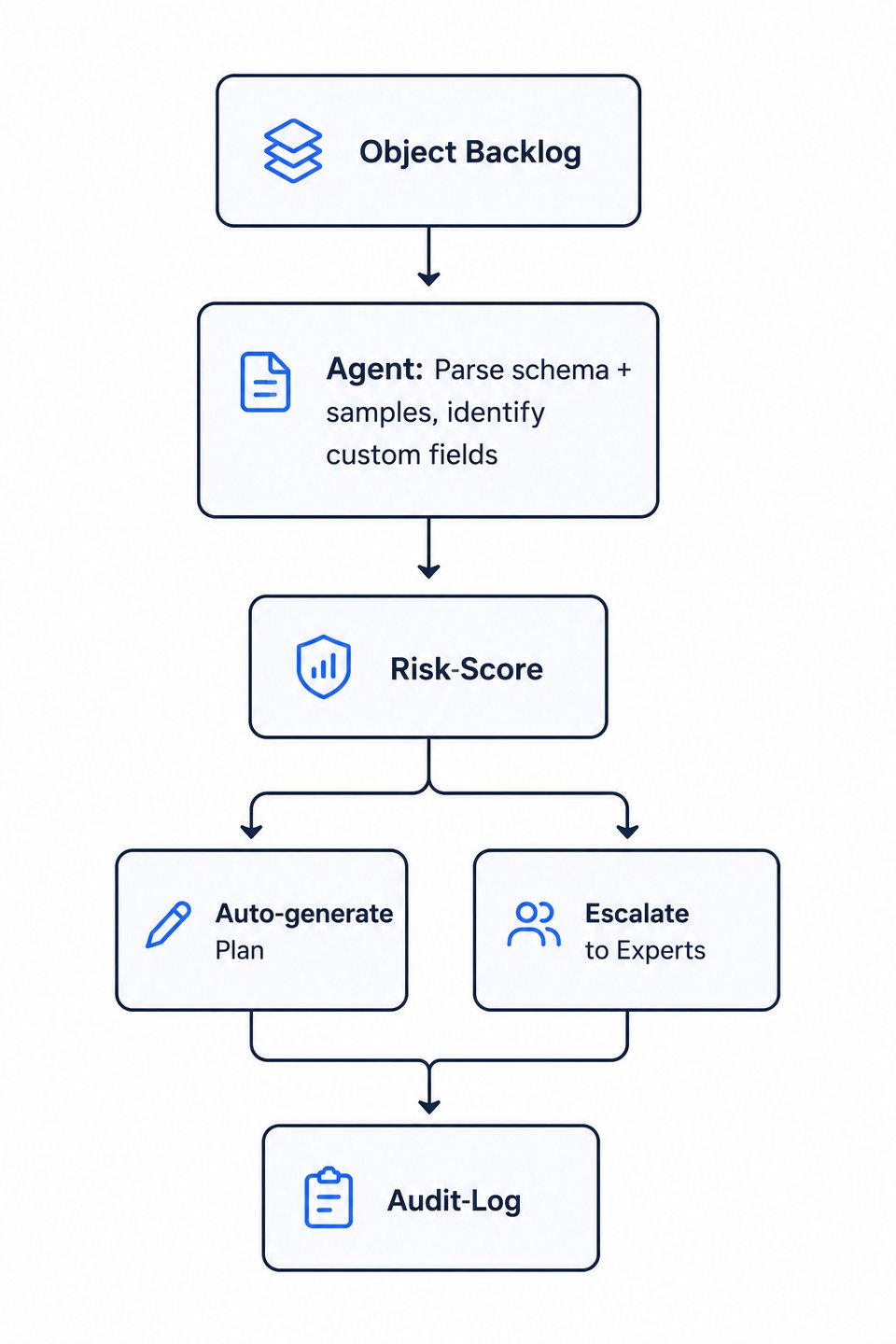
The agent works as a pre-layer over JiVS. For each migration object from the backlog, it reads schema definition and sample data directly from the SAP source system, identifies custom fields and Z-tables, proposes a mapping to the target system (S/4HANA Cloud, greenfield S/4HANA, archive), and computes a risk score. The score is checked against a threshold: below threshold, the agent writes the prepared plan directly into JiVS; above threshold, it escalates to a human migration expert — with all intermediate results exposed, so the review takes minutes instead of hours. Every step lands in the audit log in structured form.
Model-side, Claude (via Anthropic direct) is used for longer reasoning chains over complex schema structures; Azure OpenAI Switzerland is the option when Swiss data residency is a contractual condition. Tool-side, the agent accesses SAP metadata through JiVS connectors — no detour through exported files. Guardrails: a curated eval set before every deployment, cost caps per backlog run, output-schema validation against JiVS' expected format, hard escalation triggers on any mapping operation that drops custom fields.
Important: the agent doesn't make final decisions. It prepares. Migrations are irreversibly expensive — anyone building black-box automation here risks damage no eval set can ever fully cover. Instead, the agent moves human work up the stack: less routine, more review quality, complete trace.
A Swiss insurer — composite, not a real client — is preparing for an S/4HANA Cloud migration. In the backlog: roughly 400 migration objects, including twelve-year-old Z-tables with no documentation, customer-owned fields in BSEG for internal accounting logic, and a customizing inventory that hasn't been cleaned up across three reorganizations. The agent (Claude, accessed via Azure OpenAI Switzerland for Swiss FADP data residency) works through the backlog: per object it reads the schema and 50 sample records, classifies every custom field, proposes a mapping, and computes a risk score. For roughly 70% of the objects the score sits below the threshold; the plan is auto-written into JiVS. The remaining 30% land in the escalation queue with full reasoning exposed. The migration experts keep doing the same work as before — but only on the cases that actually need experience.
Typical effect: preparation of a single migration object drops from one to two days per object toward hours — directional, not a published benchmark. The leverage doesn't sit in any individual mapping but in the aggregation: a backlog of 300 to 500 objects moves off the critical path and into normal sprint throughput. Migration experts review the escalation queue and make the genuinely hard calls — routine mappings are produced by the agent. As a by-product, a complete audit trail emerges per object: input snapshot, agent reasoning, proposal, escalation decision, and human confirmation. The trail is compatible with GoBD documentation requirements and Swiss FADP traceability, and it isn't reconstructed after the fact — it falls out of the actual work.
Classical ETL tools are rule-based and structurally brittle in the face of customer-specific SAP customizing. They execute mappings that were manually decided beforehand — and exactly that manual step is the bottleneck. A migration agent reasons over schema, code references, and sample data at the same time. It catches, for example, a deprecated Z-field that standard ETL would silently transform, and raises the question of whether migrating it makes sense at all. Put differently: ETL stays unchanged underneath — the agent doesn't replace the data transfer, it replaces the human preparation in front of it. Result: same data quality, less waiting time per object, documented cleanup instead of hidden transformation.
Source side: SAP ECC 6.0 and newer, including S/4HANA on-premises and SAP IS industry solutions. Target side: SAP S/4HANA Cloud, S/4HANA on-premises as a greenfield target, or archive systems for pure historization. Older R/3 versions (4.x) are technically possible but economically often a special case — a discovery call helps assess fit. Cross-module coverage spans FI, CO, MM, SD and HCM; modules like PP or PM run agent-assisted but benefit from focused upfront alignment. The more structured and better-documented the source data model, the more leverage the agent has.
The agent classifies each field into one of four categories: still-in-use (field is actively written and read), unused (field has been empty for X months or carries a constant default), partial (field is only used for a subset of the data-type's records), unclear (meaning cannot be derived from schema and sample data). Based on the classification, the agent proposes a mapping — on "unclear" it escalates to the migration expert. Per field, an audit entry is produced with reasoning and sample data. No custom field is silently dropped.
Every agent decision is structurally logged: input snapshot (which schema definition and which sample data the agent saw), reasoning (which classification and which mapping it derived), decision (auto-write or escalate), human confirmation in the escalation case. This trail aligns with the GoBD documentation requirements for traceable data processing as well as the Swiss FADP requirement for processing traceability. Caveat: final compliance approval lies with the client's auditor — the agent provides the trail; the auditor evaluates it.
This use case sits in the Agent Systems & Workflows practice and connects to several neighboring migration use cases.
Practice: how agents are built, operated, and made audit-ready in production environments — patterns, guardrails, platform choice.
Classification of whether legacy data should be migrated, historized in JiVS, or archived — with an explainable decision trail.
Automatically reconcile Z-fields, Z-tables, and modified customizing entries against the standard data model.
Audit-ready diff reports with discrepancy classification and sign-off packages for cut-over.
This solution doesn't fit every SAP project. In a non-binding 30-minute discovery call we'll talk honestly about whether your migration is a candidate — and where classical tools are enough.
Book a discovery call