Invoices, contracts and forms structured into your ERP — OCR plus LLM, post-extraction validation, review queue for the uncertain cases.
In short: Invoices into the ERP, contracts into metadata, forms into the database. Stack: Azure Document Intelligence (Switzerland region) for OCR and layout, Claude for complex fields, structured output with validation rules, review queue for low-confidence cases. Anti-hype: this is not a "document AI miracle" — it's a tightly scoped pipeline for recurring schemas. From roughly 100 documents per month with a stable layout pattern the effort starts paying back; below that, typing it out is often cheaper and more honest.
Incoming invoices, delivery notes, contracts, forms — Excel-typing work that costs nothing but time. Every supplier has a different layout: the same invoice total sits in the top right on one bill, inside a table cell on another, and as a handwritten correction over the printed value on a third. OCR alone is not enough — mapping invoice line items to ERP accounts requires understanding the content, not just reading the text. Classical RPA workflows break on every layout change because they rely on fixed pixel or field positions.
An LLM-backed pipeline holds up — when it is configured cleanly. "Configured cleanly" means: a clearly described target schema, OCR with confidence scores, an LLM that validates fields against the schema, and a review queue that catches low-confidence cases instead of silently pushing them into the ERP. Skipping that, you end up six months later with a dataset nobody trusts — and the actual advantage is gone.
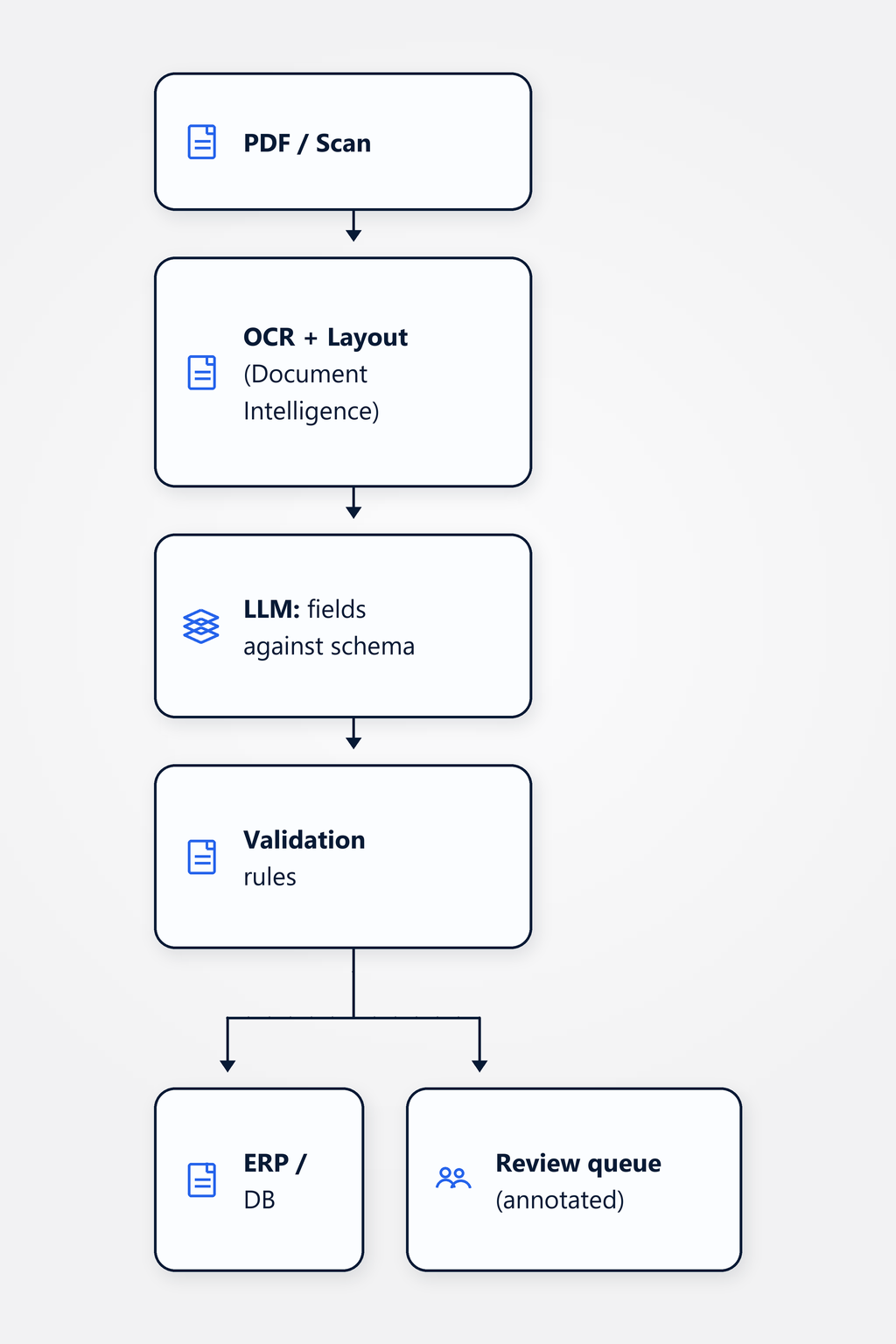
The pipeline is linear and measurable at every stage. The incoming document (PDF, scan, photo upload) goes first through Azure Document Intelligence in the Switzerland region — OCR with layout detection delivers a per-word confidence score plus the structural information of what is a table, a header, body text. In stage two, an LLM (Claude or Azure OpenAI Switzerland) extracts fields against a document-type-specific schema: for an invoice that means invoice number, date, supplier, line items, total, UID number; for a contract it's term length, notice period, counterparty, contract value. Schema-conformant structured output is mandatory — no free text coming back.
Stage three is post-extraction validation rules: invoice total must match the sum of the line items, the UID number must be Swiss-format compliant (CHE-XXX.XXX.XXX), the date must fall within a plausible window, and the supplier must match a master-data record. Anything that passes all validations and sits above the confidence threshold gets written to the ERP (or to the target database) in stage four. Anything that doesn't pass lands in stage five — the review queue, with the document annotated and the uncertain fields visually highlighted, so the reviewer can correct it in two clicks. Every correction is structurally logged; correction patterns feed back into schema and prompt improvements.
Important: the human stays in the loop — but with reduced volume. Anyone promising 100% automation hasn't looked at the edge cases. The right question is not "can we automate everything", but "what share of the volume justifies building a pipeline instead of continuing to type".
A Swiss retail company — composite, not a real client — processes around 200 incoming invoices per month across very different layouts. A mix of clearly structured supplier-standard invoices (same shape for years, the classical easy case) and creatively structured edge cases: freight bills with tables that flow across multiple pages, invoices with handwritten corrections written over the printed total, foreign-currency receipts with the CHF exchange rate stamped onto them. Before the pipeline, this went fully through one accountant — three full days of typing per month. After rollout, standard invoices flow into the ERP untouched; the edge cases land in the review queue with uncertain fields visually highlighted. The accountant does the same work as before — but only on the cases where experience actually matters.
Typical pattern: roughly 80 to 90% of invoices flow into the ERP without human touch; the remaining 10 to 20% land in the review queue. Important: that "rest" is often exactly the expensive edge cases — the foreign-currency invoice with three different VAT rates, the freight bill with a handwritten quantity correction, the construction-services contract with milestone payments. The human stays in the loop — but with reduced volume and on the cases where experience really counts. Directionally: substantial time saved on recurring documents, simultaneously better attention on the real exceptions. The 80-90% is a recurring empirical pattern, not a published benchmark; the actual ratio depends on document quality, layout stability and how well the validation rule set is maintained.
Incoming invoices are by far the most common use case, followed by delivery notes, order confirmations, contracts (metadata extraction: term length, counterparty, notice period, contract value), forms (HR onboarding, applications, customer registrations) and expense receipts. Less suitable: handwritten notes, where OCR accuracy is too low for confident writes into the ERP, and highly variable legal documents without a stable schema, where every contract type would need its own extraction prompt. Rule of thumb: if you can clearly describe the target schema up front, the document fits the pipeline. For "I know it when I see it" cases, classical manual processing with spot checks is more honest and cheaper.
Several layers interlock. (a) Azure Document Intelligence delivers a per-word confidence score — low values get marked as uncertain in the LLM prompt, so the model doesn't over-interpret them. (b) Post-extraction validation rules apply: invoice total must match the sum of line items, the UID number must conform to the Swiss format (CHE-XXX.XXX.XXX), the date must sit inside a plausible window, the supplier must match a master-data record. (c) On any conflict between OCR confidence and validation result, the document lands in the review queue with a note about which validation failed. The reviewer sees the annotated document with uncertain fields visually highlighted and can correct it in two clicks — every correction is structurally logged.
It varies by ERP. SAP: REST adapter via SAP Gateway, or direct via RFC. Abacus: REST API. Sage: ODBC or REST. Bexio: REST API. Microsoft Dynamics 365 Business Central: OData. Custom ERPs: the common paths are REST, direct database access (read-only views for master data, never write access) or file drop into existing import directories (CSV, XML, EDI). Recommendation: never write directly to the ERP database from the pipeline — always go through the official API or import path, so the ERP's own business logic (document number ranges, posting validations, tax calculation) is not bypassed. Where no API exists, a file drop into a monitored inbox folder is the next-best route.
This use case sits in the AI Engineering practice and connects to neighboring knowledge and document use cases.
Practice: LLM applications in production — RAG architectures, document intelligence, evaluation, guardrails, platform choice.
Employees chat with the HR handbook, IT policies and contract templates — answers with citations, sensitive topics escalate.
Agentic review of contracts and compliance documents against internal policies — with traceable reasoning.
A document pipeline starts paying back from roughly 100 documents per month with a recurring schema. At low volume or high layout variability, classical typing or a semi-manual tool is often cheaper and more honest. In a non-binding 30-minute discovery call we'll talk through whether your document flow and schema stability justify the effort.
Book a discovery call